Why Your Platform Choice Matters More Than Ever in 2026
Your trading platform is the infrastructure on which every decision you make is executed. It determines how quickly your orders reach the market, how accurately your strategy is backtested, how clearly you can analyse price action, and whether your automation runs reliably around the clock. In 2026, with algorithmic strategies accounting for an estimated 60 to 75 percent of total U.S. equity trading volume and retail participation in forex continuing to grow, the platform you choose is no longer a cosmetic preference — it is a structural trading decision.
The four platforms reviewed in this guide — MetaTrader 4, MetaTrader 5, cTrader, and TradingView — represent fundamentally different philosophies about what a trading platform should do and who it should serve. They are not interchangeable. Understanding their architectural differences, ecosystem depth, and practical limitations is the starting point for choosing correctly.
This guide is aimed at both beginners and experienced forex traders. If you are new to trading, Section 4 (TradingView review) and the Persona Guide will be the most immediately useful. If you are migrating from one platform to another or evaluating options for algorithmic strategy deployment, the full platform reviews and comparison table will give you the specifics you need.
The Four Platforms at a Glance
| MT4 | Launched 2005 by MetaQuotes. The world’s most popular forex platform. Forex-focused, EA automation via MQL4, 9 timeframes, 30 indicators. Over 3,000 active broker servers in 2026. |
| MT5 | Launched 2010 by MetaQuotes. Multi-asset successor to MT4. 21 timeframes, 38 indicators, MQL5 automation, hedging + netting, built-in economic calendar. All new broker launches since 2022 are MT5-only. |
| cTrader | Launched 2011 by Spotware Systems. ECN/STP-native platform built for execution transparency. Level II Depth of Market, C# automation (cAlgo), 28 timeframes, 70+ indicators. 11 million active traders, 300+ brokers. |
| TradingView | Live trading launched ~2014 by TradingView Inc. Web-first charting and analysis platform. 100+ indicators, Pine Script v6, social community of 60M+ users, broker integration for execution. Free to premium plans from $14.95–$59.95/month. |
Platform Origins & Philosophy
MetaTrader: Built for the Broker, Adopted by the Trader
MetaQuotes designed MT4 in 2005 primarily as a platform for retail forex brokers to offer their clients — not as a trader-first product. This origin is visible in its architecture: the broker controls the server, the liquidity, the execution model, and which features are exposed to the client. MT4’s massive adoption was largely broker-driven, which explains why it dominates broker availability statistics but lags in trader-centric design compared to newer platforms.
MT5 extends this model into multi-asset territory. When MetaQuotes stopped selling new MT4 licenses in 2022, it effectively mandated MT5 as the MetaTrader standard going forward. Brokers that launched after that date run MT5 exclusively, and existing brokers are progressively migrating their client bases. MT4’s 3,000+ active servers reflect its historical legacy; MT5’s server count will eventually surpass it.
cTrader: Built for the Trader, Adopted by the Broker
Spotware launched cTrader in 2011 with the explicitly opposite philosophy to MetaTrader. Rather than building a platform for brokers to white-label, Spotware built a platform that prioritised trader experience — specifically the execution transparency that ECN/STP brokers promised but that MetaTrader’s architecture did not natively support. Level II Depth of Market was not an add-on feature; it was a founding design decision. This trader-first philosophy is why cTrader’s reputation is strongest among experienced and institutional-style retail traders who demand honest pricing over platform ubiquity.
TradingView: Built for Analysis, Extended to Execution
TradingView launched as a charting and community platform — a place to publish trade ideas, share indicators, and analyse markets without necessarily executing trades. Broker execution integration came later, as the platform’s user base grew large enough to attract broker partnerships. This origin shapes TradingView’s strengths and weaknesses precisely: its charting is unmatched because it was the original purpose; its execution is broker-dependent because it was a later addition. In 2026, TradingView’s Q1 updates added AI-powered chart analysis, improved broker connectivity, and Pine Script v6 enhancements — continuing to close the gap with execution-native platforms while extending its lead in analysis.
How We Evaluated These Platforms
The TopBrokers360 team assessed all four platforms across eight criteria based on direct platform testing, verified community feedback, and independent specifications review:
- Execution Quality & Architecture: Order routing model, latency, requote frequency, and Depth of Market accessibility.
- Automation & Algorithmic Trading: Language capability, backtesting accuracy, EA/bot deployment flexibility, and VPS compatibility.
- Charting & Technical Analysis: Number of timeframes, built-in indicators, drawing tools, multi-chart layout capability, and customisation.
- Broker Availability & Ecosystem: Number of brokers offering the platform, third-party integrations, and marketplace depth.
- Beginner Accessibility: Learning curve, interface clarity, demo account availability, and onboarding quality.
- Mobile & Web Experience: Parity with desktop, stability, and execution capability on non-desktop environments.
- Cost: Platform subscription fees, whether costs are borne by the broker or trader, and value relative to features.
- Future-Proofing: Platform development trajectory, developer activity, regulatory alignment, and institutional adoption direction.
MT4 (MetaTrader 4) — Full Review
| Developer | MetaQuotes Software Corporation |
| Launched | 2005 |
| Best for | Traders with existing MQL4 EA libraries; legacy forex strategies; brokers without MT5 |
| Automation | MQL4 (Expert Advisors) — desktop only; web and mobile do not support EA execution |
| Timeframes | 9 |
| Indicators | 30 built-in |
| Cost | Free (provided by broker) |
| Broker coverage | 3,000+ active servers (2026) |
MT4 is simultaneously the most widely used forex trading platform in the world and the most outdated platform in active retail use. These two facts are directly related: MT4’s ubiquity is a product of its historical dominance, not its current technical superiority. Understanding this tension is essential for any trader evaluating whether to use or stay on MT4 in 2026.
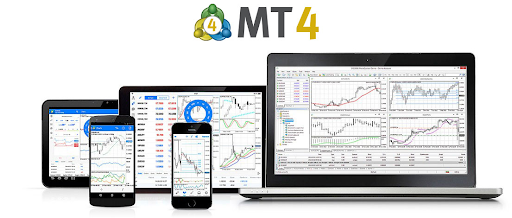
The platform’s strengths are real and cannot be dismissed. Its MQL4 ecosystem contains decades of accumulated Expert Advisors, custom indicators, and scripts. The MetaQuotes MQL5 marketplace hosts thousands of MT4-compatible tools, many of them free, many with verified live performance records. For a trader running a proprietary MQL4 strategy refined over years, the ecosystem lock-in is a legitimate reason to stay on MT4 even as its technical limitations become more apparent.
Execution on MT4 depends entirely on the broker’s server configuration — the platform itself has no native execution transparency. Unlike cTrader, which shows you Level II Depth of Market by default, MT4 shows you only what your broker chooses to display. This is not a theoretical concern: the platform’s architecture is compatible with dealing desk execution models, which is why some brokers prefer it. Traders who require genuine ECN execution should verify their broker’s execution model independently of the platform.
The key practical limitation for 2026 is MetaQuotes’ 2022 decision to stop selling new MT4 licenses. This means no new brokers can launch MT4 services. As existing brokers migrate to MT5 and new brokers launch exclusively on MT5, MT4’s broker availability will decline progressively. For traders who use only major established brokers that already offer MT4, this is not an immediate concern. For traders evaluating a new broker or expecting to change brokers in the next 1 to 3 years, MT4 availability should no longer be taken for granted.
Pros
- Largest EA and indicator ecosystem in retail forex — decades of accumulated community-built tools
- Active servers at 3,000+ brokers globally as of 2026 — unmatched broker availability
- Familiar interface for the majority of existing retail forex traders
- Stable, lightweight platform with minimal hardware requirements
- Extensive backtesting community with well-documented strategy testing methodologies
Cons
- No new MT4 broker licenses since 2022 — broker availability will decline as the market migrates to MT5
- 9 timeframes only — significantly fewer than MT5 (21), cTrader (28), or TradingView (custom)
- No native Depth of Market transparency — execution model fully controlled by broker configuration
- EA execution on desktop only — web and mobile versions do not support automated trading
- MQL4 not compatible with MT5 — any platform migration requires full strategy rewrite
- Single-threaded backtesting engine — slower and less accurate than MT5’s multi-threaded tester
MT5 (MetaTrader 5) — Full Review
| Developer | MetaQuotes Software Corporation |
| Launched | 2010 (significant retail adoption from ~2022 onwards) |
| Best for | Multi-asset traders, serious algo developers, prop firm traders, traders starting fresh |
| Automation | MQL5 (object-oriented, multi-threaded) — the most powerful scripting language in retail trading |
| Timeframes | 21 |
| Indicators | 38 built-in + MQL5 marketplace |
| Cost | Free (provided by broker) |
| Broker coverage | 3,000+ active servers (2026); all new brokers launch on MT5 |
MT5 is the present and future of the MetaTrader ecosystem. Since MetaQuotes stopped selling new MT4 licenses in 2022, every new brokerage that launches carries MT5 as its MetaTrader offering. The platform’s slower adoption relative to MT4 in its early years — driven largely by the stickiness of the MQL4 EA ecosystem and the incompatibility between MQL4 and MQL5 — has given way to meaningful traction as the industry has matured around it.
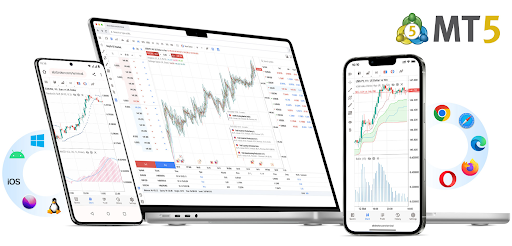
The technical upgrade from MT4 to MT5 is substantial. The jump from 9 to 21 timeframes, from 30 to 38 built-in indicators, and from MQL4’s procedural scripting to MQL5’s object-oriented, multi-threaded language represents a genuine generational improvement. MQL5 is structurally closer to C++ than to MQL4, enabling complex strategy logic, multi-symbol testing, and parallelised optimisation runs that would be impossible or impractical in MQL4.
MT5’s position accounting flexibility is a meaningful feature for forex traders. The platform supports both hedging mode (multiple simultaneous positions in the same symbol, including opposite directions — the standard for retail forex) and netting mode (single net position per symbol — the institutional standard). MT4 supports only hedging. This dual-mode capability makes MT5 the required platform for brokers operating in FIFO-regulated jurisdictions such as the United States.
The MQL5 marketplace has grown substantially and now contains a larger and more actively developed library of EAs and indicators than the legacy MQL4 ecosystem. For traders starting algo development fresh — without legacy MQL4 strategies to maintain — MT5 is the clear starting point.
Pros
- 21 timeframes and 38 built-in indicators — substantially more analytical depth than MT4
- MQL5 is the most powerful automation language available through a standard retail broker platform
- Multi-threaded backtesting enables faster, more accurate strategy optimisation than MT4’s single-threaded engine
- Supports both hedging and netting — required for FIFO-regulated markets; preferred by some multi-asset strategies
- Built-in economic calendar integrates fundamental analysis directly into the platform
- All new brokers since 2022 use MT5 — future-proof platform choice
Cons
- MQL5 is not compatible with MQL4 — existing MT4 EA libraries require full rewrite to migrate
- Steeper learning curve than MT4 — additional order types, position modes, and UI complexity take time to master
- Higher hardware resource demand — multi-EA environments or large backtests can strain older machines
- Interface dated relative to cTrader and TradingView — the MetaTrader visual design language has not evolved significantly
- Depth of Market available but limited compared to cTrader’s full Level II implementation
cTrader — Full Review
| Developer | Spotware Systems (est. 2010, Limassol, Cyprus; 150+ in-house developers) |
| Launched | 2011 |
| Best for | Active forex traders, scalpers, ECN-focused traders, C# algo developers, prop firm traders |
| Automation | C# via cTrader Automate (formerly cAlgo) — professional language; cTrader Cloud Automate for VPS-free bot hosting |
| Timeframes | 28 (26 standard + tick and second charts) |
| Indicators | 70+ built-in |
| Copy Trading | Native cTrader Copy (built-in, no plugins required) |
| Cost | Free (provided by broker) |
| Broker coverage | 300+ brokers and prop firms including IC Markets, Pepperstone, FxPro, FP Markets |
cTrader is the most technically distinguished platform in this comparison for one specific reason: it was designed from the ground up for ECN/STP execution transparency, and every architectural decision reflects that founding principle. In 2026, with the platform serving over 11 million active traders across 300 brokers and prop firms, it is no longer a niche alternative to MetaTrader — it is the primary platform of choice for traders who place execution quality above broker availability.
The Level II Depth of Market is cTrader’s most differentiating technical feature. Unlike MT4, which provides no native order book transparency, and MT5, which offers a limited DOM view, cTrader’s Level II DOM shows the full available liquidity at different price levels in real time. For scalpers and high-frequency traders, this visibility directly reduces slippage by enabling entries and exits planned against actual available liquidity rather than best-bid/best-ask alone. This is the feature that makes professional scalpers and active day traders gravitating towards cTrader even when their brokers offer MetaTrader alternatives.
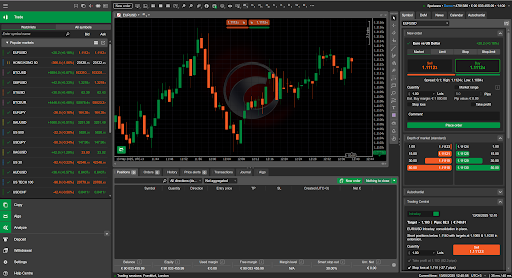
cTrader Automate (formerly cAlgo) uses C# — a widely-used, professionally maintained programming language — rather than the proprietary MQL languages that MetaTrader platforms require. For developers who already know C# or who want automation skills that transfer outside of trading, this is a significant advantage. Strategies written in C# for cTrader Automate can also be hosted on cTrader Cloud Automate, which runs bots on Spotware’s servers without requiring a local machine or third-party VPS.
Copy trading is native to cTrader — not bolted on through third-party integrations. cTrader Copy is built directly into the platform, allowing strategy providers to publish their performance records and followers to replicate trades automatically. This integrated approach is simpler and more transparent than MetaTrader’s plugin-dependent copy trading ecosystem.
cTrader’s broker network is smaller than MetaTrader’s, but the quality filter within that network is meaningful. Because cTrader’s architecture inherently supports ECN/STP execution and Spotware applies higher standards to broker onboarding, the broker options available on cTrader are generally more credible than the full MetaTrader server population. As one industry source notes: in 2026, a cTrader-based prop firm is often a safer bet from a payout stability perspective than an MT5 white-label firm whose execution model has not been independently verified.
Pros
- Level II Depth of Market by default — the most transparent retail execution environment available
- Pure ECN/STP architecture — no dealing desk compatibility; built-in protection against requotes
- C# automation (cTrader Automate) — professional language with transferable skills outside trading
- cTrader Cloud Automate — free cloud hosting for bots without requiring a VPS subscription
- Native copy trading (cTrader Copy) — integrated, no third-party plugins required
- 28 timeframes and 70+ indicators — best technical analysis depth among the four platforms (excluding TradingView)
- Modern, clean interface that matches the quality of web and mobile consumer software standards
Cons
- Smaller broker network than MetaTrader — approximately 300 brokers vs 3,000+ for MT4/MT5
- C# automation requires coding knowledge — no drag-and-drop EA builder equivalent to match MT4’s community accessibility
- No built-in social community feed — unlike TradingView, cTrader does not have a trader idea-sharing network
- Smaller legacy strategy library than MT4’s MQL4 ecosystem — fewer ready-made off-the-shelf bots
TradingView — Full Review
| Developer | TradingView Inc. |
| Launched | 2011 (charting); live broker execution integration from ~2014 |
| Best for | Beginners, discretionary traders, multi-asset analysts, Pine Script developers, social traders |
| Automation | Pine Script v6 (cloud-based, proprietary) — strategies executed via webhooks or direct broker APIs |
| Timeframes | All standard timeframes + fully custom (e.g., 3-minute, 233-tick, range bars) |
| Indicators | 100+ built-in; 150,000+ community scripts (half open-source) |
| Community | 60M+ registered users; public idea-sharing, social following, analyst profiles |
| Cost | Free (limited); Essential $14.95/month; Plus $29.95/month; Premium $59.95/month; Ultimate available |
| Broker integration | 150+ connected brokers including OANDA, Interactive Brokers, Pepperstone, TradeStation and others |
TradingView’s Q1 2026 update cycle confirmed what has been building for several years: the platform is no longer simply a charting tool with optional execution — it is a comprehensive trading workspace that leads every competitor in analysis capability and is closing the gap in execution infrastructure. The Q1 2026 updates specifically added AI-powered chart analysis, improved filing and event summaries, enhanced portfolio tracking, and continued Pine Script v6 development following its November 2024 launch.
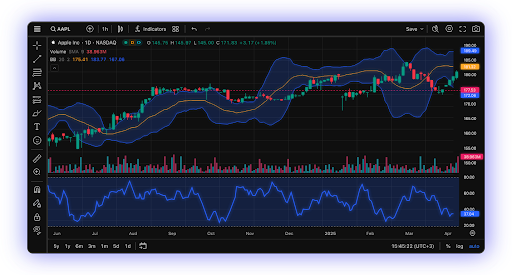
In charting terms, TradingView is definitively the best platform in this comparison. It offers over 100 built-in indicators, a community library of more than 150,000 scripts (half of them open-source), fully custom timeframes that no other platform matches, and a drawing tool set that is the most comprehensive available to retail traders. The platform renders beautifully across web, desktop, and mobile — something that cannot be said of MT4 or MT5’s web implementations. For any trader whose primary need is market analysis, TradingView is the correct starting point regardless of experience level.
Pine Script v6, released in November 2024 with monthly enhancements continuing into 2026, represents TradingView’s most significant automation upgrade. The language now features stricter typing (reducing logic bugs in automated strategies), footprint data analysis, bid/ask variable access, and improved strategy.exit() behaviour for more precise automated execution. The community-maintained library of Pine Script strategies gives TradingView the largest accessible strategy ecosystem of any platform reviewed here — though the quality of community scripts varies significantly.
Execution on TradingView is broker-dependent, which is simultaneously the platform’s most important caveat and the least well-understood aspect of its offer. Pine Script strategies cannot directly place orders on exchanges; execution requires either a connected broker or a webhook-based automation layer such as TradersPost. The execution speed and quality you experience on TradingView is therefore a function of your broker’s API integration — not TradingView’s infrastructure. For traders pairing TradingView with a well-integrated broker like OANDA, Pepperstone, or Interactive Brokers, this works smoothly. For traders with less well-integrated brokers, the additional execution dependency is a real operational risk.
The free tier of TradingView provides genuine access to core charting and a limited number of indicators and charts. The transition to paid tiers becomes necessary when traders require more simultaneous chart layouts, advanced alert conditions, multiple indicators per chart, or the Bar Magnifier backtesting accuracy tool. At $29.95/month for Plus or $59.95/month for Premium, TradingView is the only platform in this comparison that charges the trader directly — a cost consideration that should be factored into overall trading expense.
Pros
- Best charting in the industry — 100+ indicators, 150,000+ community scripts, fully custom timeframes
- Pine Script v6 is the most accessible automation language reviewed here, with the largest community library
- Web-first platform works excellently across all devices without desktop installation
- 60M+ user community provides unmatched idea-sharing, analyst content, and learning resources
- AI-powered features in 2026 — chart analysis, event summaries, and improved filtering now integrated
- Best beginner experience of all four platforms due to clean interface and community learning resources
Cons
- Execution is broker-dependent — trading speed and quality vary by connected broker’s API integration
- Premium features require paid subscription — the only platform in this comparison that charges traders directly
- Pine Script cannot directly place orders — execution requires webhooks or broker integration layer
- Less suitable for high-frequency or scalping strategies where sub-millisecond execution infrastructure is required
- Limited DOM transparency relative to cTrader — depends entirely on broker’s implementation
Full Feature Comparison Table
| Feature | MT4 | MT5 | cTrader | TradingView | Winner | Notes |
| Launch Year | 2005 | 2010 | 2011 | 2013 (live trading ~2014) | cTrader / TV | MT4 oldest; TV newest live-execution |
| Timeframes | 9 | 21 | 28 | Custom (unlimited) | TradingView | TV’s flexibility is unmatched for analysis |
| Built-in Indicators | 30 | 38 | 70+ | 100+ | TradingView | TV has the largest library by far |
| Automation Language | MQL4 | MQL5 | C# (cAlgo) | Pine Script v6 | Tie | MQL5 most powerful; Pine Script most accessible |
| Depth of Market | No | Yes (limited) | Yes (Level II) | Varies by broker | cTrader | cTrader’s Level II DOM is the retail standard |
| Execution Model | Market Maker compatible | STP/ECN capable | Pure ECN/STP | Broker-dependent | cTrader | cTrader built for transparency from day one |
| Copy Trading | Via plugins | Via plugins | Built-in (cTrader Copy) | Via broker | cTrader | Native cCopy is seamless; MetaTrader needs add-ons |
| Broker Availability | 3,000+ servers | 3,000+ servers | 300+ brokers | 150+ broker integrations | MT4 / MT5 | MetaTrader platforms dominate broker coverage |
| Mobile App Quality | Adequate | Good | Excellent | Excellent | Tie | cTrader & TV mobile are best-in-class |
| Web Platform | Basic | Basic | Full-featured | Full-featured | Tie | MT web versions lag desktop; TV & cTrader match |
| Social / Community | MQL5 market | MQL5 market | cTrader Store | Large public community | TradingView | TV’s community is the largest in retail trading |
| Cost to Trader | Free (broker) | Free (broker) | Free (broker) | Free–$59.95/month | MT4/MT5/cTrader | TV charges for premium features; others broker-funded |
| Best For | Legacy EA traders | Multi-asset algo traders | ECN scalpers & active traders | Discretionary traders & beginners | — | Use case drives the right choice |
Which Platform for Which Trader? (Persona Guide)
| Trader Persona | MT4 | MT5 | cTrader | TradingView |
| Complete Beginner | ✓ Adequate | ✓ Good | ✓ Good | ✓✓ Best |
| Discretionary Forex Trader | ✓✓ Best | ✓ Good | ✓ Good | ✓✓ Best |
| Scalper / Day Trader | ✓ Adequate | ✓ Good | ✓✓ Best | ✓ Adequate |
| EA / Algo Developer | ✓✓ Best | ✓✓ Best | ✓ Good | ✗ Limited |
| Multi-Asset Trader | ✗ Limited | ✓✓ Best | ✓ Good | ✓✓ Best |
| Copy / Social Trader | ✓ Adequate | ✓ Adequate | ✓✓ Best | ✓ Good |
| Swing / Position Trader | ✓ Good | ✓✓ Best | ✓ Good | ✓✓ Best |
| Prop Firm Trader | ✓✓ Best | ✓✓ Best | ✓✓ Best | ✓ Adequate |
Reading This Table
‘Best’ means the platform that best serves that trader type in 2026 across the full combination of execution, tooling, automation, and ecosystem. ‘Adequate’ means the platform works for that use case but is not the optimal choice. ‘Limited’ means the platform has structural gaps that create meaningful disadvantages for that trader type.
Prop firm traders score highly on MT4, MT5, and cTrader because the major prop firm challenges are designed around those platforms — most use MT4 or MT5 for their challenge environments, while cTrader-based prop firms are growing rapidly. TradingView is adequate but less common in prop firm contexts as of 2026.
Platform Switching: What to Know Before You Change
Switching from MT4 to MT5
The single most important fact about switching from MT4 to MT5 is that MQL4 Expert Advisors do not run on MT5. The two platforms use entirely different programming languages, and the logic for order handling, pending orders, and hedging differs between them. If you have custom MQL4 EAs, switching to MT5 requires a full rewrite in MQL5 — there is no automatic conversion tool that produces reliable results. Discretionary traders or those using only third-party indicators can switch more straightforwardly, though they should verify that their specific indicators have MT5 versions available.
Switching from MT4 or MT5 to cTrader
Moving to cTrader from MetaTrader involves adapting to a different interface philosophy and a different automation language. If you use automated strategies, any MQL4 or MQL5 code must be completely rewritten in C# for cTrader Automate — there is no cross-compatibility. Manually, the transition is more manageable: cTrader’s interface is generally rated as more intuitive than MetaTrader’s, and most of its charting functions have direct equivalents. The main practical consideration is broker availability — confirm that your preferred broker offers cTrader before committing to the platform.
Adding TradingView as a Second Platform
Many experienced traders in 2026 use TradingView alongside a primary execution platform rather than replacing it. TradingView for analysis and charting, connected to a MetaTrader or cTrader broker for execution, is a common and well-supported workflow. This approach captures TradingView’s superior charting without sacrificing the execution infrastructure of a dedicated trading platform. Pepperstone, OANDA, and IC Markets all support TradingView integration alongside their MetaTrader and cTrader offerings.
Switching Costs
The real cost of switching platforms is time, not money. The direct costs of all four platforms to the trader are either zero (MT4, MT5, cTrader — funded by the broker) or modest (TradingView’s subscription tiers). The indirect cost is the learning curve and, for automated traders, the strategy redevelopment time. Before switching, be honest about whether the capability improvement justifies the redevelopment investment for your specific trading approach.
Conclusion
After a thorough evaluation of all four platforms across every dimension that matters for forex traders in 2026, the honest verdict is this: there is no universally best platform, but there is a clearly best platform for each type of trader.
MT4 remains the correct choice only for traders with established MQL4 strategies that would require significant redevelopment to migrate. For everyone else starting fresh or migrating, MT4’s declining broker network and technical limitations do not justify choosing it over MT5 or cTrader.
MT5 is the right choice for traders who want MetaTrader’s ecosystem with a future-proof platform — particularly those trading multiple asset classes, developing serious algorithmic strategies in MQL5, or working with brokers that have already moved to MT5-only infrastructure.
cTrader is the right choice for active forex traders who prioritise execution transparency, scalpers who need Level II Depth of Market visibility, algo developers who prefer C# over MQL languages, and traders using regulated ECN/STP brokers where execution quality is verifiable. Its growing prop firm network makes it increasingly relevant for funded trader programmes as well.
TradingView is the right choice for beginners as a learning and analysis environment, for discretionary traders of any experience level who want the best charting available, and for traders who want to participate in a genuine market analysis community. As a standalone trading execution platform for high-frequency or complex automated strategies, it is not the optimal choice — but as part of a combined workflow alongside a dedicated execution platform, it is unmatched.
The practical recommendation for 2026: if you are new to trading, start on TradingView with a connected demo account. Once you have a clear trading style, choose your execution platform based on this guide’s persona table. If you are an established trader, the only reason to switch platforms is if your current choice has a structural gap that your trading style requires filling — not because another platform is newer or more discussed.
FAQs
Is MT4 still worth using in 2026?
MT4 remains relevant in 2026 for one specific reason: traders with established MQL4 EA libraries and strategies have no compelling reason to migrate unless their broker drops MT4 support. For those traders, MT4's ecosystem advantage outweighs its technical limitations. For anyone starting fresh, choosing MT4 in 2026 means committing to a platform with a shrinking broker network and no new license sales — MT5 or cTrader is the more future-proof decision.
What is the main difference between MT4 and MT5?
The most important differences are: MT5 uses MQL5 (incompatible with MQL4), offers 21 timeframes instead of 9, supports multi-asset trading beyond forex, includes a built-in economic calendar, and runs a multi-threaded backtesting engine. MT4 and MT5 are not upgrades of the same system — they are architecturally separate platforms that share a visual design language. Migrating your strategies between them requires a full rewrite.
Is cTrader better than MT5?
For execution transparency and active forex trading, cTrader is the superior platform. For multi-asset strategy development and access to the largest algo trading language ecosystem (MQL5), MT5 is stronger. The correct answer depends on your trading style: scalpers and active day traders typically prefer cTrader; algo developers and multi-asset traders typically prefer MT5. Both are strong choices; neither is universally superior.
Can I use TradingView for live forex trading?
Yes, through connected brokers. TradingView integrates with over 150 brokers for live execution, including OANDA, Pepperstone, and Interactive Brokers. The execution experience depends on your broker's API integration quality. TradingView is primarily an analysis platform, and many traders use it for charting and signal generation while executing through a separate platform. For live automated trading via Pine Script, execution requires webhooks or a broker integration layer — Pine Script strategies cannot directly place orders on exchanges.
Which platform is best for a complete beginner?
TradingView is the most accessible entry point for beginners, due to its clean web-based interface, extensive community learning resources, and no-installation-required setup. The free tier provides meaningful access to professional-quality charting. For a beginner who wants to progress to live trading quickly, AvaTrade's AvaTradeGO or a simple MT4 setup with a regulated broker provides a straightforward path. cTrader is genuinely suitable for beginners despite its professional reputation — its interface is more intuitive than MetaTrader's, and cTrader Copy allows participation in automated trading without any technical knowledge.
Does cTrader have more brokers than MT4?
No. MT4 has active servers at over 3,000 brokers globally. cTrader is used by approximately 300 brokers and prop firms. However, cTrader's broker network is filtered by its ECN/STP architecture requirements — the 300 brokers on cTrader have been held to higher execution standards than the full MT4 broker population, which includes market makers and dealing desk operators. For traders prioritising execution transparency, the relevant comparison is not broker count but broker quality.
Is TradingView free to use for trading?
TradingView offers a free tier with genuine charting functionality. Paid plans start at $14.95/month (Essential) and go to $59.95/month (Premium), with an Ultimate tier available. The features most relevant to serious traders — multiple chart layouts, more indicators per chart, advanced alerts, the Bar Magnifier backtesting tool, and faster data refresh — are behind paid tiers. Unlike MT4, MT5, and cTrader, TradingView's premium features are charged directly to the trader rather than funded by the broker.
Which platform do prop trading firms use in 2026?
The majority of prop firm challenges in 2026 use MT4 or MT5, with MT5 increasingly dominant among newer prop firms. cTrader-based prop firms are a growing segment — Spotware's ecosystem specifically supports prop firm workflows, and several industry reviews note that cTrader prop firms have a stronger payout reliability reputation than some MT5 white-label operations. TradingView is used by a small number of prop firms but is not the standard.